How-To Guide · October 24, 2026
How to Cold Call a Local Business to Sell a Website
A 6-step guide to cold calling local businesses about a new website, with a simple script, common objections and how to answer them, and a follow-up plan.

Cold calling still works for selling websites to local businesses. Owners of restaurants, salons, and contractors often pick up their own phone, and a short, specific call can start a real conversation faster than an email. This guide shows you how to prepare, what to say, how to handle common objections, and how to follow up.
Why cold call local businesses?
- You reach the decision maker. At small businesses, the person who answers is often the owner or someone who can get you to them.
- You get a quick answer. A "yes," "no," or "send me something" in two minutes beats waiting on emails.
- It's easy to be specific. If you mention a real problem with their website, the call feels helpful instead of random.
How to cold call a local business: 6 steps
1. Build a short call list of businesses that need help
Don't call every business on the block. Start with ones that have a clear website problem: no website, a site that's down, or a site that's slow or hard to use. Locasly finds local businesses on Google Maps and scores their websites from 0 to 100 using PageSpeed, WCAG accessibility checks, and website status. You can filter by No Website, Website Down, Has Score, Open Now, rating, and business type, then save your best picks as leads.
2. Learn one or two things about each business
Before you dial, spend a couple of minutes on their website and Google listing. Note one or two findings you can say in plain words, like "your site takes a while to load on a phone" or "your website isn't loading right now." Our guide on how to audit a local business website before you pitch covers what to check.
3. Call at a good time
Avoid the busiest hours. For a restaurant, that means not during lunch or dinner rush. For most service businesses, mid-morning or mid-afternoon on a weekday works better than first thing in the morning or right before closing. Locasly's Open Now filter helps you skip businesses that are closed.
4. Use a short, simple script
Your opening should take about 20 seconds. Use this structure:
- Who you are: "Hi, this is [Name], I'm a local web designer."
- Why you're calling them: "I was looking at [Business Name]'s website and noticed it's slow to load on phones."
- A small ask: "Would it be okay if I sent you a quick preview of what an updated homepage could look like?"
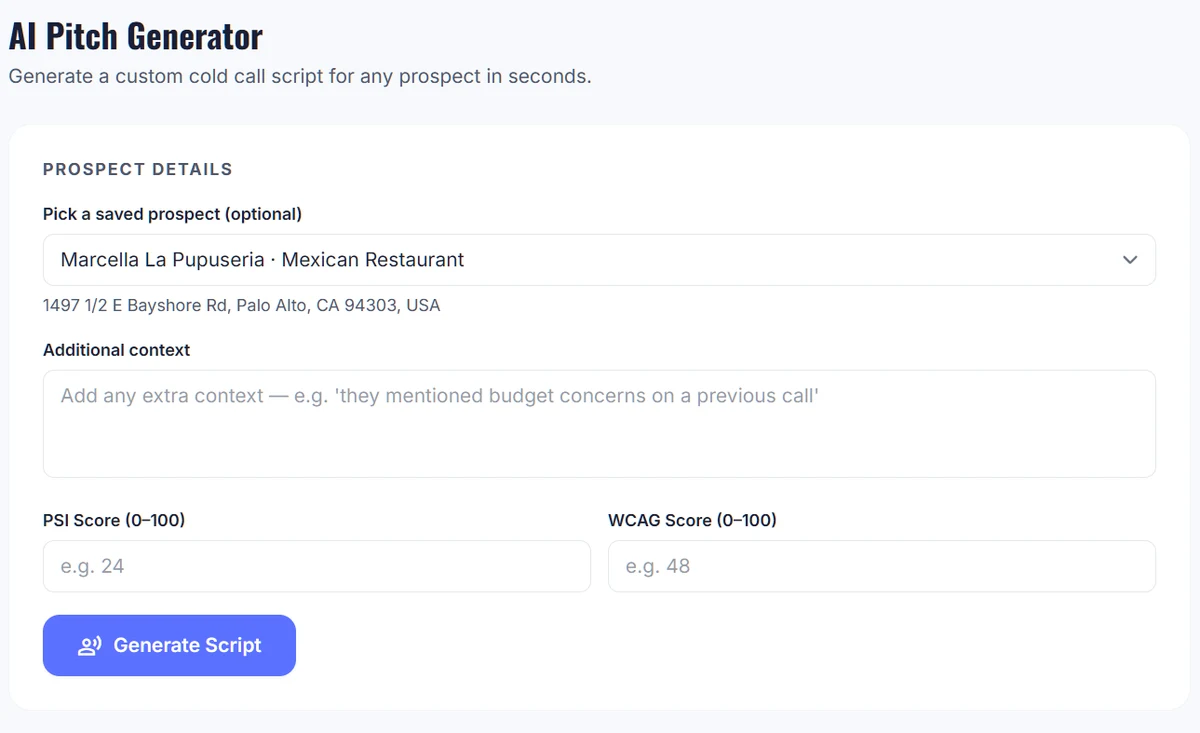
In Locasly, the AI Pitch page writes a custom cold call script for a prospect. Pick a saved prospect, add any extra context, enter their PSI (PageSpeed) and WCAG scores, and click Generate Script.
5. Handle objections calmly
Most objections are not a hard no. Agree with the owner first, then give one short reason to keep talking. Common ones:
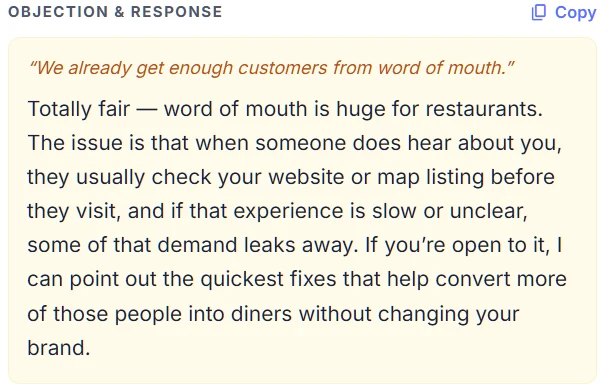
- "We get enough customers from word of mouth." Agree, then point out that people who hear about them usually check the website or map listing before visiting.
- "We already have a website." Mention the specific issue you found and offer to show what it could look like fixed.
- "I don't have time right now." Ask for a better time, or offer to send a short preview they can look at later.
- "How much does it cost?" Give a simple range and offer to show a preview first. See how much to charge for a small business website.
Locasly's generated scripts include an objection and a suggested response, which you can copy and adjust to sound like you.
6. Log the call and follow up
Right after each call, write down what happened. In Locasly, you can log a call from the prospect panel by tapping the phone number, and move the business through the pipeline: Lead, Contacted, Proposal, and Sold. If they asked for a preview, send it within a day. You can build a mockup with Locasly's AI website generator, or copy its ready-made prompt into another AI builder. If you don't hear back, follow up once or twice over the next week, then move on.
Tips for better cold calls
- Stand up and smile while you talk. It makes your voice sound more relaxed.
- Keep it short and let them talk. Ask one question and listen.
- Never pressure anyone. A polite "no problem, thanks for your time" keeps the door open.
- Check local rules on business calling and respect any request not to be contacted again.
FAQ
How many businesses should I call per day?
Start with a number you can keep up, like 10 to 20 well-researched calls. Quality matters more than volume when your pitch is about a specific problem.
Should I cold call or cold email first?
Either works. Many freelancers call first, then email a preview after the owner says yes. If calling feels hard, start with our guide on how to cold email a local business.
What if I get voicemail?
Leave a short message: your name, the one issue you noticed, and that you'll send a quick preview. Then try again in a few days.
Do I need a script?
A short script helps you stay calm and on point. Use it as a guide, not something to read word for word.
Steps at a glance
- Build a short call list
Start with local businesses that have no website, a down site, or a slow or hard-to-use site.
- Learn one or two things about each business
Check their website and Google listing and note one or two plain-language findings.
- Call at a good time
Avoid rush hours; mid-morning or mid-afternoon on weekdays usually works best.
- Use a short, simple script
Say who you are, the specific issue you noticed, and ask a small question like sending a preview.
- Handle objections calmly
Agree first, then give one short reason to keep talking or offer to send a preview.
- Log the call and follow up
Record the outcome, move the lead through your pipeline, send any promised preview, and follow up once or twice.