How-To Guide · October 24, 2026
How to Find Local Businesses Without a Website
How to find local businesses that have no website, double-check them, prioritize the best leads, and reach out with a mockup and a short message.
Local businesses without a website are some of the easiest clients for a freelance web designer to pitch. You're not asking them to replace something they paid for. You're offering them something they don't have yet. This guide shows you how to find these businesses, check that they really have no site, and decide who to contact first.
Why target businesses with no website?
- The need is easy to explain. "People who search for you can't find a website" is simple to say and simple to understand.
- There's no old designer or contract in the way. You don't have to talk them out of a site they already like.
- A preview does a lot of the selling. Showing an owner a mockup of their own site makes the idea real fast.
How to find local businesses without a website: 6 steps
1. Pick an area and one or two business types
Start small. Choose a town or a few neighborhoods you can reach, and focus on one or two kinds of businesses, like plumbers, bakeries, or hair salons. Working one niche at a time makes your pitch sharper because the same talking points apply to every business on your list.
2. Search Google Maps for that business type
Search something like "plumber near [city]" on Google Maps and open each listing. A business with no website usually has no "Website" button on its listing, or only links to a social media page. This works, but checking listings one by one is slow.
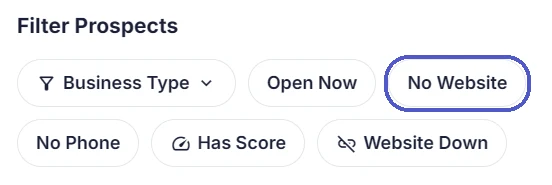
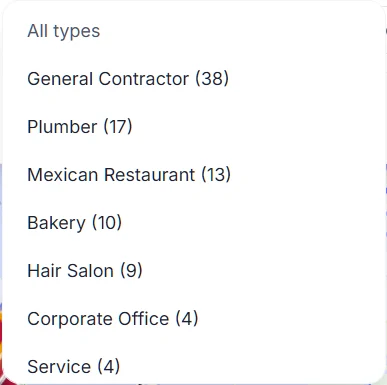
Locasly speeds this up. It pulls local businesses from Google Maps for the area and radius you set, and lets you filter the results. Turn on the No Website filter to see only businesses without a website listed, and use Business Type to narrow it to your niche.
3. Double-check that they really have no site
A missing website on Google Maps doesn't always mean there's no website. Before you reach out, take a minute to:
- Search the business name and city on Google.
- Check whether their Facebook or Instagram page links to a site.
- Look at their Yelp or other directory listings for a web address.
If you find a site that just isn't linked on Google Maps, that's still a useful thing to tell them. If you find a site that won't load, our guide on finding local businesses with broken or down websites covers that kind of lead.
4. Prioritize who to contact first
Not every business without a website is a good fit. Put these at the top of your list:
- Good ratings and steady reviews. These businesses have real customers and something worth showing off. Locasly's rating filters (4.5+, 4.0+, 3.5+) help here.
- Currently operating. Use the Open Now filter, or check their posted hours, to skip places that may have closed.
- A phone number listed. It gives you a direct way to reach the owner.
5. Save your picks and make a quick mockup
Add your best prospects as leads so you can track them. In Locasly, each prospect has a Pipeline section where you can mark them as a Lead, then Contacted, Proposal, and Sold. From the same panel, you can use the AI Website Generator to draft a website for the business, or generate a copy-paste prompt for builders like v0, Lovable, Bolt, or ChatGPT. A simple preview with their name, services, hours, and reviews gives the owner something concrete to look at.
6. Reach out with a short, specific message
Keep it simple: who you are, what you noticed ("I couldn't find a website for your shop"), and a small ask ("Can I send you a free preview I made?"). Locasly can generate a cold call script with an opening and answers to common objections. For a full walkthrough, see our guide on how to cold call a local business to sell a website.
Tips to keep your list useful
- Work one area and niche at a time, then move on.
- Note the date you contacted each business so you know when to follow up.
- Export your list to CSV if you want to keep notes in a spreadsheet.
FAQ
Do many local businesses still not have a website?
It depends on the area and the type of business. Service businesses like contractors and some family-run restaurants often rely on word of mouth or a social media page. The quickest way to know is to search your own area and see.
Is a Facebook page the same as a website?
No. A Facebook page helps, but the business doesn't control how it looks or ranks, and some customers don't use Facebook. A website gives them a home base they own.
What should I say if they say they don't need a website?
Agree that word of mouth is great, then mention that people who hear about them often search for them online first. Offer to send a free preview with no pressure.
How many businesses should I contact at once?
Start with a list you can actually follow up with, like 10 to 20 businesses. Following up well usually matters more than reaching a huge number of people.
Steps at a glance
- Pick an area and one or two business types
Choose a town you can reach and focus on one or two niches.
- Search Google Maps for that business type
Look for listings with no Website button, or use Locasly's No Website and Business Type filters.
- Double-check that they really have no site
Search the name, and check social media and directory listings for a web address.
- Prioritize who to contact first
Start with well-rated, currently operating businesses that list a phone number.
- Save your picks and make a quick mockup
Add them as leads and create a simple website preview for each.
- Reach out with a short, specific message
Say who you are, what you noticed, and offer to send a free preview.