How-To Guide · October 26, 2026
How to Write Title Tags and Meta Descriptions for a Local Business Website
A simple way to write title tags and meta descriptions for local business pages: one main search per page, service and city up front, a clear next step, and an AI prompt for drafts.

The title tag and meta description are the first things most people see from a local business website, usually right on Google's results page before they ever click. A lot of small business sites leave them as "Home" or the business name alone. This guide shows you how to write both for a local business, page by page, in plain language.
What title tags and meta descriptions do
The title tag is the clickable headline in search results and the text on the browser tab. It is one of the clearest signals of what a page is about, so it matters for rankings and for clicks.
The meta description is the short summary under that headline. It doesn't directly affect rankings, but a clear one can earn more clicks. Google often rewrites both based on the search, so your job is to give it a strong, accurate version it wants to keep.
Step-by-step: writing them for a local business
1. Pick one main search for each page
Before writing anything, decide what a customer would type to find that page. For a local business, that's usually a service plus a place, like "emergency plumber Fresno" or "nail salon downtown Merced."
- Homepage: the main service and main city.
- Service pages: that specific service and the city.
- Contact or location page: the business name, neighborhood, or city.
One main search per page keeps you from writing the same title on five pages.
2. Write the title: service, city, then brand
A simple pattern that works for most local pages:
[Main Service] in [City] | [Business Name]For example: "Brake Repair in Merced | Valley Auto Care." A few rules:
- Put the service and city near the front, since the end can get cut off.
- Aim for about 50 to 60 characters so the important part shows in full.
- Keep it readable. Don't cram in a list of neighborhoods or repeat the keyword three times.
- Make every page title unique.
Google may still move the brand to the front or shorten your title. That's normal. Short, clear titles that match the page tend to be shown closer to how you wrote them.
3. Write the meta description like a mini ad
Aim for roughly 140 to 155 characters, with the most important part first because mobile shows less. A good local description answers three things:
- What you do and where.
- Why someone should pick you (hours, same-day service, free estimates, family-owned, only if true).
- What to do next (call, book, get a quote, visit).
Example: "Same-day brake repair in Merced. Honest quotes, quick turnaround, and friendly mechanics. Call or book online today."
4. Match the page and the Google Business Profile
The title and description should match what's actually on the page, especially the main heading (H1). If the title says "Brake Repair in Merced," the page should clearly talk about brake repair in Merced.
Keep the business name and city consistent with the Google Business Profile, too. If you haven't set that up yet, see our guide on how to optimize a Google Business Profile.
5. Use AI for drafts, then check them
AI tools are great for first drafts. Give them the real details and limits, then edit what comes back:
Write an SEO title tag (max 60 characters) and meta description
(max 155 characters) for the [page name] page of [Business Name],
a [business type] in [City]. Main service: [service].
Real selling points: [list only true facts].
Put the service and city near the start of the title.
No exaggerated claims and no keyword stuffing.
Give me 3 options for each.
Count the characters, remove anything that isn't true, and make sure no two pages end up with the same wording.
6. Check how they show up and adjust
After the site is live, search for the business and its main service. See how the title and description look on a phone. If Google keeps rewriting a title, it's often a sign the title doesn't match the page well or is too long. In Google Search Console, pages with lots of impressions but few clicks are good candidates for a rewrite.
Turning this into a service for local clients
Missing or generic titles are one of the easiest things to spot when you audit a local business website before you pitch. Fixing them is a small, clear improvement you can include in a website build or offer as part of ongoing SEO help.
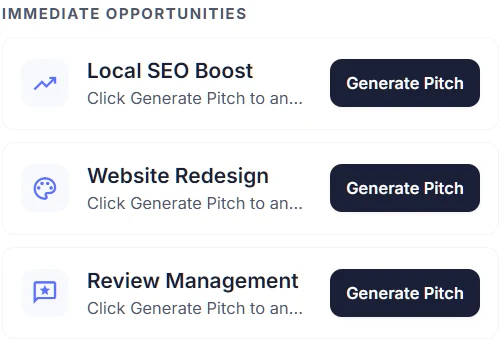
In Locasly, each prospect's panel includes an Immediate Opportunities section with a Local SEO Boost pitch you can generate, which helps when you want to lead with SEO instead of a full redesign.
FAQ
How long should a title tag be?
About 50 to 60 characters is a good target. Longer titles aren't a penalty, but the end usually gets cut off, so keep the service and city up front.
Should the business name go in the title?
Usually yes, at the end. On the homepage some people lead with the brand, and Google sometimes moves it to the front anyway. Either is fine as long as the main service and city are included.
Why does Google change my meta description?
Google often picks text from the page that better matches a specific search. Writing a clear, accurate description still helps, because it's used when it fits the search well.
Should I add "near me" to titles?
Generally no. People type "near me," but Google uses their location to answer it. A real city or neighborhood name is clearer and more useful.
Steps at a glance
- Pick one main search for each page
Decide the service plus city a customer would search for each page.
- Write the title: service, city, then brand
Use [Service] in [City] | [Business Name], about 50-60 characters, unique per page.
- Write the meta description like a mini ad
About 140-155 characters covering what and where, why choose you, and a clear next step.
- Match the page and the Google Business Profile
Make the title match the H1 and page content, and keep name and city consistent with the profile.
- Use AI for drafts, then check them
Give an AI tool real details and limits, then check length, accuracy, and uniqueness.
- Check how they show up and adjust
Search for the business, review results on mobile, and rewrite low-click pages using Search Console.